

Hardware Review
Ubiquiti U6 Long Range Access Point
| Manufacturer | Ubiquiti |
|---|---|
| Model | U6 Long Range Access Point |
| Category | WiFi access point |
| Rating | ★★★★★ |
| Homepage | store.ui.com/us/en/pro/collections/unifi-wifi-flagship-long-range/products/u6-lr |
Summary
UniFi U6 Long Range review: one ceiling-mounted U6-LR covers a 4,000 sq ft two-story home, ~50 devices, no dead spots. WiFi 6, seamless roaming. Mind the LED.
Review
The Ubiquiti U6 Long Range access point makes a bold claim right in its name. After deploying a single ceiling-mounted unit in a 4,000 square foot two-story home, that claim holds up–complete coverage across both floors with no dead spots, handling approximately fifty devices without complaint. Previous access points produced spotty coverage in corners and struggled through walls; those problems simply don’t exist with this unit. The UniFi integration is seamless, roaming between multiple APs is invisible to connected devices, and WiFi 6 efficiency keeps everything stable even when the household is actively streaming, video conferencing, and transferring files simultaneously. Just don’t mount it on your bedroom ceiling–the blue status LED is bright enough to disturb sleep.
Specifications
| Spec | Detail |
|---|---|
| Standard | WiFi 6 (802.11ax) |
| Form factor | Disc-shaped, ceiling-mounted |
| Coverage (tested) | 4,000 sq ft, two stories, single unit |
| Device load (tested) | ~50 devices |
| Management | UniFi controller (Dream Machine / Cloud Key); single-click adoption |
| Roaming | Seamless between multiple APs; wired backhaul |
| Status LED | Blue; bright; can be disabled in software |
Coverage That Actually Delivers
A single ceiling-mounted U6-LR covers the entire house across both floors without coverage gaps. Previous access points had produced spotty coverage in corners and struggled through walls–problems that simply don’t exist with this unit. The “long range” designation isn’t marketing fluff; it’s an accurate description of the hardware’s capabilities.
For context: this is one access point covering 4,000 square feet across two stories. That’s genuinely impressive performance.
UniFi Integration
If you’re already running a UniFi ecosystem with a Dream Machine or Cloud Key, the management experience is as smooth as it gets. Adoption is a single click. The access point appears in your controller, you click adopt, and it’s configured. Firmware updates flow through the same centralized management as the rest of your UniFi devices.
There’s no separate app, no secondary login, no configuration portal to bookmark. It’s just another device in your unified network dashboard.
Handling Device Density
With approximately fifty devices spread across the network, the U6-LR handles the density without complaint. WiFi 6 (802.11ax) brings improved efficiency for environments with many simultaneous connections, and that translates to stable performance even when the household is actively streaming, video conferencing, and moving data around.
Roaming
For larger deployments with multiple access points, roaming between units is seamless. Devices transition between APs without dropped connections or noticeable interruption. Wired backhaul keeps inter-AP communication fast, and the mesh configuration handles itself automatically through the UniFi controller.
The UFO in Your Ceiling
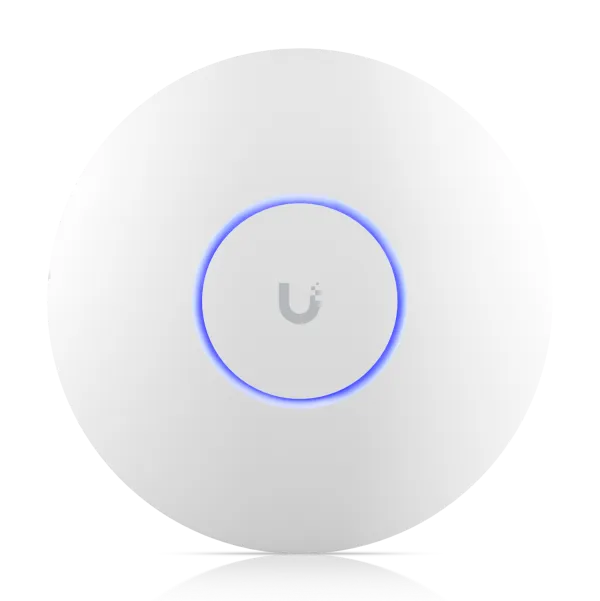
The U6-LR’s disc-shaped design has a distinctive UFO aesthetic. Whether you find this charming or odd is a matter of taste, but it’s certainly recognizable as UniFi hardware.
One practical note: do not mount this on your bedroom ceiling. The blue status LED is bright enough to disturb sleep. Mounting locations in hallways, living areas, or utility spaces avoid this issue entirely. The LED can be disabled in software, but that requires remembering to configure it.
The Value Proposition
This is where the U6-LR distinguishes itself from less expensive access points. A single unit replaced what would have required two or three cheaper APs to cover the same space–and those cheaper units still left dead spots. When factoring in reduced hardware count, simpler wiring, and eliminated coverage gaps, the premium pricing becomes more reasonable.
For smaller spaces, the U6-LR is likely overkill. For larger homes or challenging layouts with multiple floors and solid walls, it earns its place.
Frequently Asked Questions
How much area does the U6-LR cover? In my install, a single ceiling-mounted unit covers a 4,000 square foot two-story home with no dead spots – including the corners and through-wall spots where previous access points struggled.
How many devices can the U6-LR handle? Around fifty across my network, without complaint. WiFi 6 (802.11ax) keeps performance stable even when the household is streaming, video conferencing, and moving data at the same time.
Does it need a separate app or login? No. If you run a UniFi ecosystem with a Dream Machine or Cloud Key, adoption is a single click and firmware updates flow through the same controller as the rest of your devices.
How does roaming work with multiple U6-LRs? Seamlessly. Devices move between APs with no dropped connections or noticeable interruption, with wired backhaul keeping inter-AP communication fast and the mesh configuration handled automatically by the controller.
Is the U6-LR worth the premium price? For larger or awkward layouts, yes – one unit replaced what would have taken two or three cheaper APs that still left dead spots. For smaller spaces it’s likely overkill.
What’s the catch with the U6-LR? The blue status LED is bright enough to disturb sleep, so don’t mount it on a bedroom ceiling. You can disable the LED in software, but you have to remember to do it.
Verdict
The U6 Long Range does exactly what it promises: reliable WiFi 6 coverage over a large area with seamless UniFi integration. One access point covering a 4,000 square foot two-story home with no dead spots is the kind of result that justifies the investment. Just mind the bedroom ceiling placement.
My UniFi Ecosystem
I purchased these components together as my entry into the UniFi ecosystem:
- Ubiquiti Dream Machine Pro - The network controller and router
- Ubiquiti U6 Long Range Access Point - Whole-home WiFi 6 coverage
- Ubiquiti Switch Pro 24 PoE - Managed switching with PoE
- Ubiquiti Mini Rack - Compact rackmount enclosure